
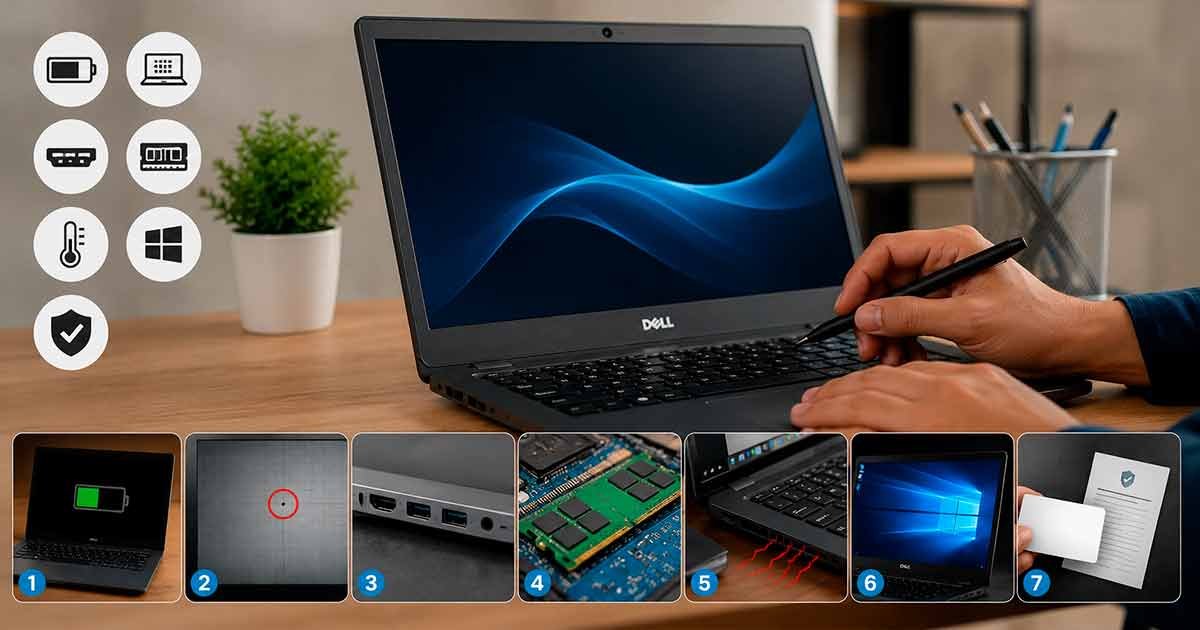
You can make huge savings by opting for second hand laptop. However, it can also go really wrong if you do not know what to check before buying second hand laptop. A laptop can still have a defective battery, broken display condition, or fake software running inside it but look perfectly normal on the outside. This refurbished laptop buying guide India helps you through what to look for before you pay so you know exactly what it is and about used laptop inspection guide.
Why does it matter to check a refurbished laptop while buying
A used laptop is not a new laptop. It is secondhand, it gets repaired or refurbished and resold. In most cases, this works out quite well since you end up with a decent laptop at a significantly lower price. However, sellers can sometimes skip over some important checks and you might find that a laptop that looked great in pictures is fretting within a fortnight.
This is why we need an appropriate second-hand laptop checklist India. Checking up for a few minutes before you buy can save you months of issues later on.
-
Battery Health Check
The first thing is battery health check and the one people most often skip.
No matter how good care you take batteries have their own expiry date. For example, a used laptop will be able to last for only two hours on battery instead of eight. You have to actually test this, which is not always visible in sight of the laptop.
In a battery health test, here are the things to look for:
- Request the battery health percentage from the seller (most laptops display this in settings)
- Any value greater than 80% is considered to be good
- Test the laptop for no less than 20–30 minutes unplugged to observe its discharge velocity.
- Test if the laptop dies suddenly when you unplug, this can be a big red flag.
Another rule of thumb has been that if a seller cannot tell you what the battery health is, that’s a red flag already.
-
Check For Dead Pixels & Backlight Issues On The Display
You’re going to be staring at the screen every single day so display condition is worth careful checking.
Launch a blank document or a plain white image to perform the checkup for display condition properly and scan the entire surface of your screen cautiously. Pixels appear as tiny black or coloured dots on the screen that do not change. Look at the corners and edges for dimming, this is usually assigned as the black light is not going to last too long.
Things to check:
- Open a completely white screen and check it for dark spots and dead pixels
- Open a solid black screen and see if any bright patches appear in the process (backlight leak).
- Hold the screen at a slight angle to ensure that the colours remain consistent
- Check for flickering when you move the screen up and down
This check matters far more than most people may think as this will be an expensive fix later when a screen issue arises.
-
Ensure All Ports and Connections Are Tested
It is easier to ignore those ports until it comes to a time you need them.
Test port functionality before you buy, by connecting a charger, USB, headphones and check the HDMI port if you can. Loose or non-functioning ports are often seen on older laptops, and many sellers do not mention it unless you ask them to.
Quick test list:
- Charging port: does it charge without having to jiggle/jerk the cable
- Battery: in what condition is it and how long does it last
- Test USB ports: attach a USB drive and see if you can detect it
- Headphone jack: you should never just look at it, always try with real headphones
- WiFi + Bluetooth: connect to a network and pair a device to check both functionalities
The test, which takes under five minutes (including a reboot), informs you quite a bit about the laptop’s health.
-
Verify RAM and SSD Specs
The SSD is an important point as sometimes the specs given by sellers differ from what’s actually inside the laptop. That’s not always deliberate, sometimes a part is replaced during the refurbishment process and it can fall through the cracks to list without updating.
Check the real RAM upgrade potential and SSD speed, that match your problem. This is one click in System Settings on Windows. Get them to do this on the actual laptop you are buying and not a sample unit.
What to verify:
- The amount of RAM (4GB, 8GB, 16GB etc.)
- Storage type SSD or the still widely used HDD, and a massively slower speed difference.
- Check file opening speed and laptop boot time:
This single check saves one of the most prevalent issues with refurbished laptops
-
Overheating Test
A laptop, getting too hot to touch is not just an irritant, but a symptom of an internal cooling issue that may increase and shorten the life of the machine.
So, use the laptop for around 20 minutes, do normal tasks, web searching, video playback, and firing up a few other programs. Keep your hand closer to the air vents and also on the base of the laptop. And if it runs uncomfortably hot or the fan roars like a lion, then know it’s best to ask about that before you part with your cash.
Simple overheating test:
- Use the laptop continuously for 20–30 minutes
- Do keyboard test, check the base and in front for extra heat
- Listen for the fan running loudly or continuously
- Verify the laptop does not slow down noticeably after some time of use
-
Verify Authentic OS License
Everyone just assumes the operating system is right, so this one is an easy mark to miss. It often isn’t.
With the original OS license, you cannot ignore problems with updates, security or face unexpected activation warnings after a few months. The second-hand market commonly sells pirated or unlicensed Windows installations and it can lead to real problems down the line.
How to check:
- Navigate to Settings, Activation Status
- Should have a valid license that says Windows is activated
- Inquire directly from the seller if the OS license genuine
- Be Wary of laptops where the seller is vague about this, or dodges the question
-
Demand for Warranty Card & Invoice
This last check is not a transaction one, it is to protect you post-purchase not pre-purchase.
An official document like an invoice and warranty card to confirm that you purchased it from a legitimate source gives you something to back up on, should a problem occur. For refurbished laptops, this is particularly key. The type of company you purchase from will frequently dictate what grade refurbishment the laptops fall into (A-level, B-level or C-level) as determined primarily by performance and physical damage signs.
Ensure you get before you Pay:
- A correct laptop invoice with details and price
- Warranty tracing Card or warranty documentation period (even 3-6 months is significant)
- Heavy on realistic specifics of what the warranty brings to the table
- A phone number or process for reporting problems in case something should go awry
All These Checks Done For You by Refurb Sewa
Doing all seven checks yourself is time-consuming and requires some technical knowledge, but most buyers simply lack the resources or experience to check everything appropriately.
This is where Refurb Sewa comes into play. When it comes to laptops, each one is tested for battery health, display condition and ports and connectivity tests; RAM and SSD tests; an overheating test; and OS license confirmation before it even hits the market. You will also get a proper invoice and warranty with every laptop for future reference, so you will never be in the dark about what you actually bought.
Your laptop has been tested, verified, and guaranteed, instead of you doing all this checking yourself.
Every Refurb Sewa laptop gets pre-checked on all 7 points. Browse certified laptops here.
FAQs
- How do I know that the refurbished laptop is having screen issues?
Use plain white and black screens to check for dead pixels, bright spots, screen flickering, and backlight issues.
- Why should I check RAM specifications?
Checking the real specifications helps make sure you receive the performance and storage size that has been promised by the vendor.
- Does a refurbished laptop need an activated Windows license?
Definitely, a real active license of Windows prevents future problems with security, updates and hardware activation.
- What kind of warranty should a refurbished laptop have?
Does a warranty and invoice give you peace of mind as well?

